
HOW TO REGISTER a WinRAR License Key
When you clicked on the link contained in the email, you will see the following notification:

- Choose save!

- Choose open folder!
Right-click on the rarkey file
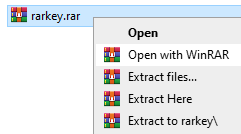
- and select Open with WinRAR
The following message will be displayed:
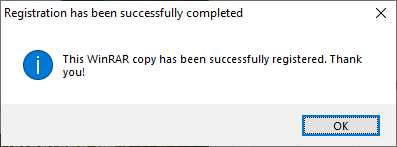
- Simply click “OK” and you’re ready to go!
TROUBLESHOOTING AND TIPS FOR WinRAR INSTALLATION & REGISTRATION
- Please ensure that you have downloaded and installed WinRAR
- Please make sure that WinRAR is set as your default program for .rar files
If you see the following error message when trying to register your WinRAR license key:
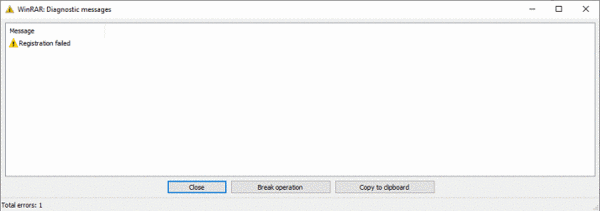
Please make sure that you have the latest version of WinRAR installed.
If you are still having problems installing your registration key and these troubleshooting tips were not helpful, please contact support@win-rar.com
In Windows, go to Settings and select Apps from the list:
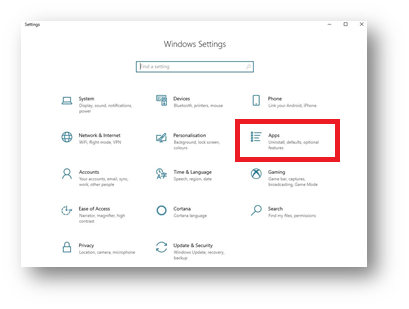
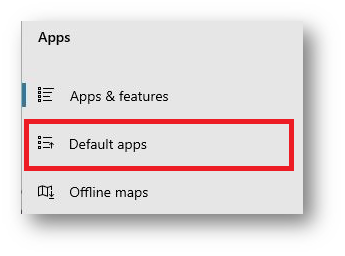
Select Default apps from the list of the left:
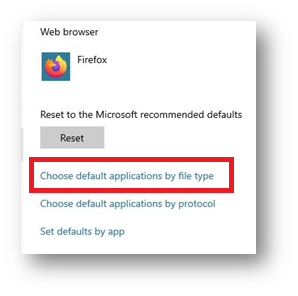
Scroll down and select Choose default apps by file type
Scroll through and make sure that WinRAR is set as the default to open files with the .rar extension:
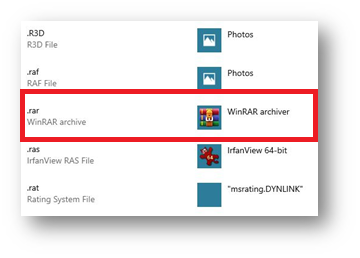
- WinRAR can be set as the default program to open many different file extensions!
To check if your WinRAR license has been registered successfully, open WinRAR and click on the “Help” tab at the top of the WinRAR window:
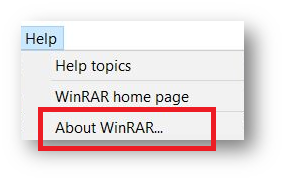
Select “About WinRAR” and the following window will open and with your registration details:
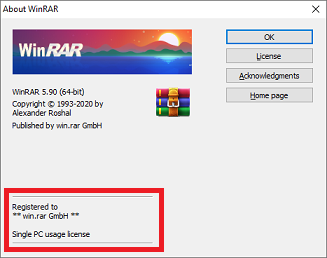
- Your registration was successful!